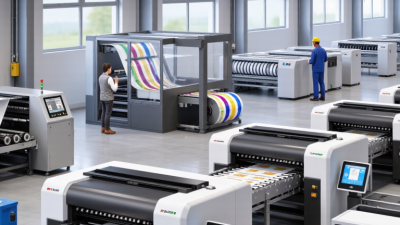
Why Choose a Printer for Packaging?
Packaging is often the first product detail a customer can touch. A crisp label, readable ingredients, and accurate colors build confidence before the box is opened. Choosing a Printer For Packaging can help brands manage these details while protecting product presentation. The right partner may also coordinate materials, print methods, finishing, and delivery. Small choices matter. A carton that scuffs in transit or a barcode that prints poorly can create avoidable problems.
Printing educator Frank Romano is a relevant industry reference, but I cannot verify a packaging-specific quotation from him. To avoid misattribution, the following is an original editorial line, not a quote from Romano: “Good packaging print makes product information clear and the brand easy to recognize.” It is a practical test, not a guarantee. Buyers should ask for material samples, color proofs, and clear specifications before approving a run. Check how the print looks under store lighting. Check whether small text remains legible on the actual package.
A capable packaging printer can advise on print consistency, finishing options, and production constraints. Ask about quality checks and how defects are handled. Request examples from comparable packaging jobs, not just polished mockups. One limitation deserves attention: the lowest unit price may not reflect setup costs, waste, or delivery timing. Compare complete quotes. Then decide which trade-offs fit the product, budget, and launch schedule. A good decision is rarely made from color alone.
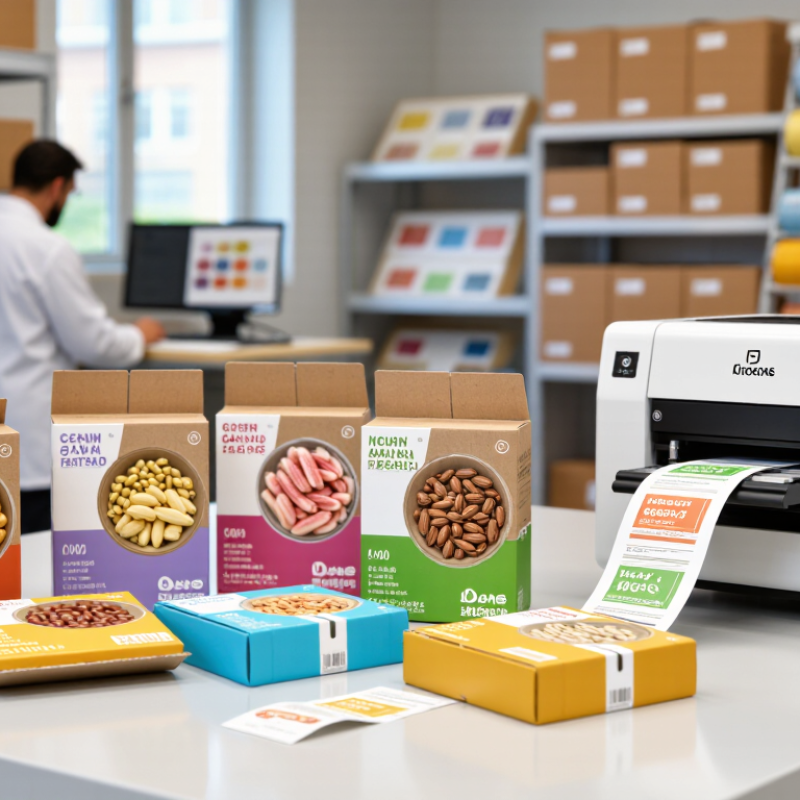
What a Packaging Printer Does
A packaging printer applies text, graphics, and machine-readable codes to labels, cartons, flexible films, or corrugated board. Depending on the equipment, printing happens before or after the package takes shape. The job is practical: keep colors consistent, place artwork accurately, and make dates, barcodes, and instructions readable. Small details matter. A barcode that prints too faintly may fail at scanning, while poor ink adhesion can leave marks on a folded carton.
Before a run, operators check the artwork, material, ink, and print settings. During production, they monitor registration, color, drying, and code quality. Some systems also print variable details, such as batch numbers, without changing the main artwork. The U.S. EPA’s 2018 Advancing Sustainable Materials Management report found that containers and packaging represented 28.1% of U.S. municipal solid waste by weight. That figure is not specific to printing, but it puts the material stakes in perspective: accurate setup can help avoid preventable misprints and rework. It cannot fix an oversized package or poor design, though. That distinction is easy to overlook. A final inspection should check the printed surface under realistic light and handling conditions, not just on a screen.
How Printing Improves Product Identification and Traceability
Packaging printing gives each unit a clear identity before it reaches a shelf or warehouse. A printed product name, size, and description help staff distinguish similar packs quickly. Lot numbers and production dates add another layer of detail. Small marks matter.
Variable data printing can place a different code on each package, such as a barcode or QR code. When scanned, that code may connect the pack to records about its batch, production time, or destination. This supports traceability during receiving, stock rotation, and quality checks. The code must remain legible after handling, though. A barcode blurred by condensation or placed across a fold may not scan reliably.
Good results depend on practical choices: ink contrast, package surface, code placement, and line speed. Teams should test samples under real lighting and handling conditions, then verify codes during production. A readable sample at the start is not enough. Errors still happen. A printer can improve identification, but it cannot repair incomplete records or careless checks. That part deserves honest attention. A simple routine—scan, compare, and record—can reveal problems while affected packages are still easy to locate.
Which Packaging Materials and Formats Can Be Printed
Why Choose a Printer for Packaging?
Which Packaging Materials and Formats Can Be Printed
A packaging printer can apply product details, instructions, and visual design directly to packaging or to labels. Suitable materials include paper, paperboard, corrugated board, and flexible films. Some systems also print on rigid plastics and coated surfaces, but surface treatment and ink compatibility matter. Ink must stay put. A glossy pouch and a rough shipping box need different print settings and drying conditions.
Common formats include folding cartons, corrugated cases, roll-fed film, stand-up pouches, sleeves, and pressure-sensitive labels. Flexible packaging is a major category: the Flexible Packaging Association’s 2023 State of the U.S. Flexible Packaging Industry report puts U.S. sales at $42.9 billion in 2022. That figure describes a large, varied market, not a guarantee that one printer suits every film. The format matters.
Smithers’ The Future of Global Packaging to 2028 estimated the global packaging market at about $1.17 trillion in 2023. This scale helps explain why packaging printers serve many substrates and production setups. For a real job, test a sample using the actual material, ink, and finish. Check small text, color, rub resistance, and whether the print survives folding or sealing. I would not choose from a material list alone; humidity, coatings, and line speed can change the result. That is easy to overlook.
Why Choose a Printer for Packaging?
Packaging printers can apply product information, branding and graphics to many materials and formats. The chart compares common packaging formats by the number of example print-process families used for them.
Counts are examples of commonly used process families, not market-share figures. Suitability depends on the substrate, package design, print requirements and production setup.
How Packaging Printers Support Efficiency and Brand Consistency
A packaging printer can bring artwork and production closer together. Instead of sending every change through a separate print supplier, teams may prepare approved files and print closer to the packing line. This can shorten handoffs and make small runs easier to manage. A carton design update, for example, can move into production without leaving stacks of outdated packaging behind. The gains depend on setup, print speed, and how often designs change.
Small details matter.
Consistent output takes more than reusing the same file. Teams need to check color, alignment, legibility, and drying on the actual packaging material. A red logo can look different on coated paper and corrugated board, even with identical settings. Saved print profiles and routine sample checks help keep cartons, labels, and inserts aligned across batches. Variable information, such as product codes, can also be added while keeping the main design stable.
But a printer is not a cure-all: rushed approvals or poorly prepared artwork can create new delays. It is easy to focus on machine speed and overlook the time needed for testing. A simple printed proof under normal lighting may catch problems before a full run begins.
What to Consider When Choosing a Packaging Printer
Choosing a packaging printer begins with the package itself, not the machine. Kraft paper, folding cartons, and glossy labels behave differently under pressure, heat, and ink. Bring actual production materials to a supplier or test facility. A smooth sample sheet is not enough.
Match the print method to your order volume, artwork, and frequency of design changes. Short runs with frequent updates may suit digital printing, while long, stable runs may favor conventional processes. Check fine lines, small text, color consistency, and barcode readability on finished packaging. Ask how inks dry or cure, and whether printed surfaces resist scuffing during packing and transport. Small details matter.
Examine the whole workflow. Measure usable speed after setup, cleaning, and changeovers, not just the advertised maximum. Confirm the printer fits your floor space, operators’ skills, maintenance schedule, and finishing equipment. Request a trial with real files and materials. Record waste, setup time, and print quality. The trial may reveal awkward steps nobody mentioned. Compare operating costs, including consumables and downtime, with the purchase price. A printer that looks efficient on paper may need more attention than your team can spare. Keep test samples for comparison.
Why Choose a Printer for Packaging? - What to Consider When Choosing a Packaging Printer
| Printing Technology | Common Packaging Uses | Suitable Run Length | Key Advantages | Considerations | What to Check Before Choosing |
|---|---|---|---|---|---|
| Flexographic printing | Flexible films, labels, corrugated board, paper bags, and folding cartons | Medium to long runs | Prints on many materials, supports roll-to-roll production, and can be efficient for repeat jobs | Requires printing plates; setup and plate costs can make frequent short runs less economical | Substrate compatibility, number of colors, registration accuracy, plate costs, and changeover time |
| Digital inkjet printing | Labels, corrugated packaging, cartons, and selected flexible packaging applications | Short to medium runs; also useful for variable designs | Can produce variable data and multiple designs without printing plates; supports quick job changes | Print speed, ink and substrate compatibility, and finishing requirements vary by system | Required resolution, food-contact compliance where applicable, drying or curing method, and total cost per job |
| Digital electrophotographic printing | Labels, folding cartons, and some flexible packaging workflows | Short to medium runs | Offers fast changeovers and consistent results for multiple versions or personalized designs | Material range and maximum format may be more limited than with some conventional presses | Supported stocks, color consistency, maximum sheet or web size, finishing options, and click or consumable costs |
| Offset lithographic printing | Folding cartons, paperboard packaging, and printed paper components | Medium to long runs | Can deliver fine detail and consistent color on suitable sheet materials | Typically requires plates and make-ready; generally less suited to direct printing on non-porous flexible films | Board thickness range, sheet size, coating options, color control, and compatibility with downstream converting |
| Gravure printing | High-volume flexible packaging, films, and some paper packaging | Very long runs | Designed for sustained high-volume production and repeat jobs with consistent image reproduction | Engraved cylinders involve substantial setup investment, so short or frequently changing jobs may be uneconomical | Expected annual volume, cylinder costs, changeover needs, ink system, and production line requirements |
| Thermal transfer printing | Product labels, shipping labels, and variable information on packaging | Short runs and on-demand printing | Practical for barcodes, batch details, dates, and other variable information | Usually intended for labels or coding rather than full-color graphics across large packaging areas | Label material, ribbon compatibility, print width, barcode readability, and required print durability |
| All technologies | Any packaging application requiring printed graphics or information | Choose based on order size, frequency, and design variation | A well-matched system can support product presentation, traceability, and efficient production | Printer cost alone does not determine suitability; materials, setup, labor, maintenance, and finishing also affect total cost | Packaging format, substrate, run length, print quality, color requirements, compliance needs, speed, service, and total cost of ownership |
Related Posts
-
2026 Best Packaging Printer Types for Global Buyers?
-
Ultimate Guide to Choosing the Best Custom Packaging for Diverse Product Types
-
Top Packaging Food Trends for 2026 What You Need to Know?
-
The Ultimate Guide to Creating Effective Personalised Packaging Solutions
-
How to Choose the Best Packaging Printer for Your Business?
-
How to Identify the Best Custom Food Packaging Suppliers for Your Business: Key Industry Insights